Please read this chapter before your first trip. It explains what the app can and can't know, and how to stay safe while you use it.
2.1Using the app while you drive
WarningNever handle the phone while you drive. Set up the whole trip before you move. If you need to change something, pull over and stop first. Or ask a passenger to do it.
Plan your route, pick your vehicle and tap Start while you're parked. After that, the app speaks each turn out loud. So you can keep your eyes on the road.
Put the phone in a mount where you can see it without reaching. Set the volume before you leave, so you can hear the turns.
WarningThe road in front of you always comes first. Look at the screen only when it's safe, and only for a moment.
CautionRules about phones in vehicles differ from place to place. Check the rules where you'll be driving.
NoteTurn by turn directions need your location. The app asks for it the first time you tap Start or Nav.
2.2Where the app's facts come from
Motocamp builds its map from many outside sources. Some come from government offices. Some come from volunteers who map roads. Weather and fire facts come from weather services and satellites.
Any of these can be out of date or wrong. That includes:
Road closures and the seasons when roads are shut.
Fires seen by satellites.
Height, width, length and weight limits on roads and bridges.
Speed limits and speed camera spots.
Opening times, fees and rules at campgrounds.
Weather forecasts and rain radar.
Fuel prices.
WarningSigns on the road always come first. So do police, rangers, fire crews and other local officials. If the app and a sign disagree, follow the sign.
CautionNo warning in the app doesn't mean a road is clear. It may only mean nobody has told the map.
NoteEach state shares a different amount about closed roads. Some share nothing about back roads. Call the park or forest office before you head down a long track.
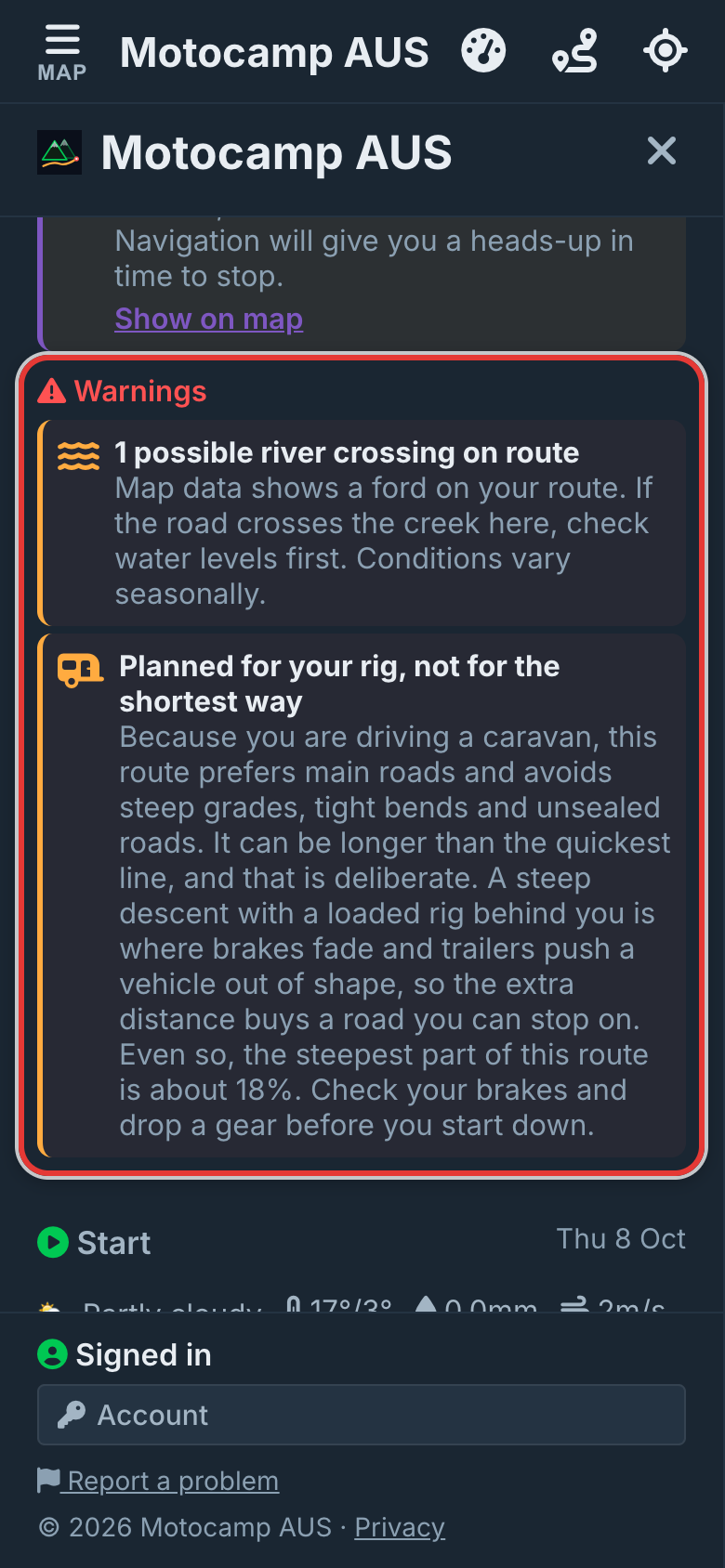
NoteRead the Warnings under your route before you leave. They list gates, water crossings, closed roads and limits your vehicle won't fit under.
Warnings, under the Route Summary.
2.3Fires
WarningA fire on the map shows where a satellite saw heat. It isn't the edge of the fire. The real fire may be much bigger. Cloud, smoke or the time of the pass can hide a fire completely.
No fire on the map doesn't mean no fire. The fire layers don't change when you have no signal. So check again before you head out.
WarningFollow your state's fire service for closures and warnings. If you're told to leave, leave.
WarningCheck every low bridge, height bar and weight limit yourself. The app knows only the posted limits that are in its map. Many real signs aren't on the map yet.
This matters most if you drive a caravan or a motorhome. The app plans around the posted limits it knows. It also warns you about any it couldn't avoid.
You can set your vehicle's height. The width, length and weight come from the vehicle you pick.
CautionMeasure your real height. Count anything on the roof, like a roof tent, a rack, an aerial or an air conditioner.
CautionWhen you tow, the app picks gentler roads where it can. Sometimes there's no gentler road, and the warning says how steep it gets. With no signal, it can only judge hills where you've downloaded the 3D hills. 3D means the map shows hills and valleys in shape.
CautionTurn by turn directions keep the screen on and track your location the whole time. This drains the battery fast. Plug the phone in for long drives.
The 3D view in navigation uses the most power. 3D means the map shows hills and valleys in shape. When the battery runs low, tap the 3D button on the navigation screen. It changes to 2D, a flat map that uses less power.
NoteBig map downloads use power too. Keep the phone on its charger while they run.
2.7In an emergency
WarningIn an emergency, call 000 (triple zero). Motocamp can't call for help. It doesn't tell anyone where you are.
Before you go, switch on Hospitals & Clinics in the Layers tab. Then you'll know where the nearest one is.
NoteWith no signal, a call may not go through. Far from towns, think about taking a rescue beacon or a satellite messenger.
2.8Speed limits and speed cameras
CautionSpeed camera pins are places that people have reported. Nothing on them is live. Cameras that move aren't in the list. Drive to the posted limit, not to the map.
Speed Limit Alert works only in navigation. It knows only the limits that are in the map. On a road with no limit in the map, it stays quiet.
WarningThe map doesn't know how deep a water crossing is. Rivers rise fast after rain. Check the water before you cross. Never drive into flood water.
CautionForest and farm gates may be locked, often out of season. Leave every gate as you found it.
CautionHigh roads can be shut by snow, even when the app shows no warning. Call the park or road office before you commit.
NotePlan with AI builds real routes from the same map. Still, check the line on the map before you go. The distance on each option is only a guess until you open it.
NotePlaces added by other people say unconfirmed until someone checks them. Treat them as a tip, not a fact.